Wednesday, February 18, 2015

How to Archive in Outlook 2010

Microsoft Outlook allows individuals to archive items in order to free up space in their inbox. They are saved in Outlook data file format, or ".pst." You can either set up an automatic archive feature or manually archive emails and items regularly. This article will tell you how to archive in Outlook 2010.

Method 1 of 2: Archive Outlook Manually


1
Open Microsoft Outlook 2010.
  • If you are using Microsoft Outlook on an Exchange Server account this function is most likely not available to you. Archiving is controlled by server administrators, rather than individuals.
  1. Archive in Outlook 2010 Step 11.jpg
    2
    Click on the "File" tab on the top horizontal bar.
  2. Archive in Outlook 2010 Step 3.jpg
    3
    Select "Cleanup Tools" from the options.
  3. Archive in Outlook 2010 Step 4.jpg
    4
    Click on the "Archive" option.
  4. Archive in Outlook 2010 Step 5.jpg
    5
    Select the choice to archive folders, including subfolders, in the dialog box.
  5. Archive in Outlook 2010 Step 6.jpg
    6
    Choose the folder you would like to save and archive in the browser window.You can archive each folder one at a time, or select the top level to archive the entire mailbox.
  6. Archive in Outlook 2010 Step 7.jpg
    7
    Choose a date when Outlook will decide items should be archived. All emails, calendar appointments and documents originating before this date will be archived.
    • If you want to override any items that were marked as "Do Not Archive," you can check this box now. This will override that instruction for this single manual archive.
      Archive in Outlook 2010 Step 7Bullet1.jpg
      1. Archive in Outlook 2010 Step 8.jpg
        8
        Select the location of your archive file. It may be automatically saved in an Archive folder under "Outlook Files"; however, you can use the browser function to choose any location on your computer or a removable disc.
      2. Archive in Outlook 2010 Step 9.jpg
        9
        Press the "OK" button to archive your items.
      3. 10
        Return regularly to archive your Outlook files. You will also want to backup all of your computer files regularly, including your archived Outlook items.
      4. Credits to the original article. Click here to view (http://www.wikihow.com/Archive-in-Outlook-2010)
      ===========❤❤❤============
      Thanks for reading. 
      Will be much appreciated if you 
      "follow my page", "recommend/like this article" 
      and "leave a message"
      Stay Awesome and Be Blessed Today!
      Zen Lakwatsera
      ===========❤❤❤============

Outlook.com Mail Server Settings

This article helps me a lot in setting my outlook account in my computer. So hopefully this helps you as how it helps me. (highlighted some information for more convenience)
Outlook.com is designed by Microsoft as an alternative to Google Gmail. And – just like Gmail – you can configure your favorite email client to send & receive emails through your outlook.com email account. To do so, you need to know the Outlook.com mail server settings.

Basically, you can add your outlook.com account to any email client that supports POP3 or IMAP, like Microsoft Outlook Professional, Windows Mail, Android or iOS mail apps, etc. Depending on your email client application, you can add & configure your outlook.com email account as a POP3 account or as an ActiveSync / Exchange service.
Later edit (13.09.2013): Microsoft added support for the Outlook.com IMAP email protocol, from 12th of September 2013.

We will explain below how to add your outlook.com email account to Outlook 2013 – the mail server settings are the same for all email client applications, as long as they support the related email protocol (for example, ActiveSync is supported mainly by Microsoft products like Outlook 2013).

Outlook.com "POP Mail" Server Settings

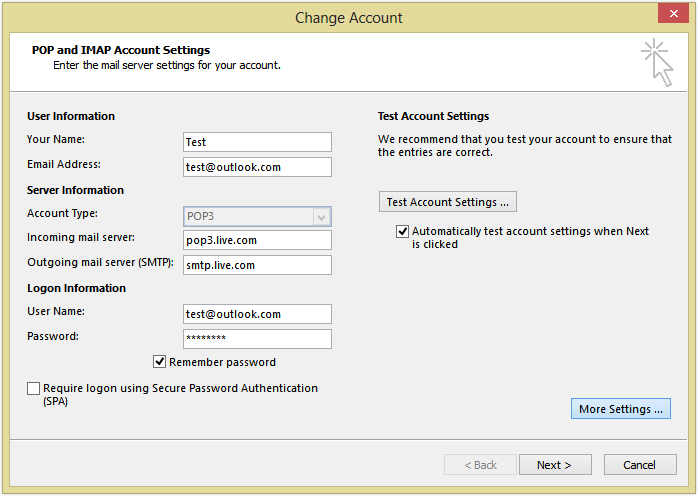
When you add the outlook.com account to Outlook 2013, on the first screen make sure you select “MANUAL SETUP OR ADDITIONAL SERVER TYPES”. On the next screen, choose “POP or IMAP” and enter the following Outlook.com mail server settings in the Server Information fields:
Account type: POP3
Incoming mail server:
pop3.live.com
Outgoing mail server (SMTP):
smtp.live.com
Logon Information:
User Name: yourusername@outlook.com email address
Password: yourusername@outlook.com password
outlook.com mail server settings
Then click on the “MORE SETTINGS” button:
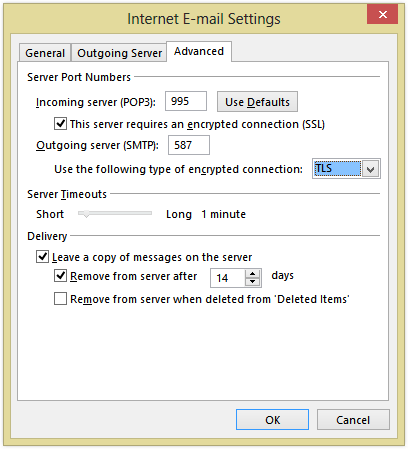
Outgoing Server tab: mark the box “My outgoing server (SMTP) requires authentication” and select “use same settings as my incoming mail server”.
Advanced tab – Server Port Numbers:
Incoming server (POP3): port 995
 – you must also mark the box “this server requires an encrypted connection (SSL)”
Outgoing server (SMTP):
port 587 – you must also choose “TLS” for the option “Use the following types of encrypted connection”.
Outlook.com Mail Servers Port
You can use the same Outlook.com POP server settings for any other email app, including iOS or Android Email apps.

Outlook.com "IMAP Mail" Server Settings

You have to follow exactly the same procedure as above, except that you need to select IMAP as your email account type (and not POP).
Account type: IMAP
Incoming mail server:
imap-mail.outlook.com
Outgoing mail server (SMTP):
smtp-mail.outlook.com
Logon Information:
User Name: yourusername@outlook.com email address
Password: yourusername@outlook.com password
Then click on the “MORE SETTINGS” button:
Outgoing Server tab: mark the box “My outgoing server (SMTP) requires authentication” and select “use same settings as my incoming mail server”.
Advanced tab – Server Port Numbers:
Incoming server (POP3): port 993
 – you must also mark the box “this server requires an encrypted connection (SSL)”
Outgoing server (SMTP):
port 587 – you must also choose “TLS” for the option “Use the following types of encrypted connection”.
You can use the same Outlook.com IMAP server settings for any other email app, including iOS or Android Email apps.

Outlook.com Active Sync Settings

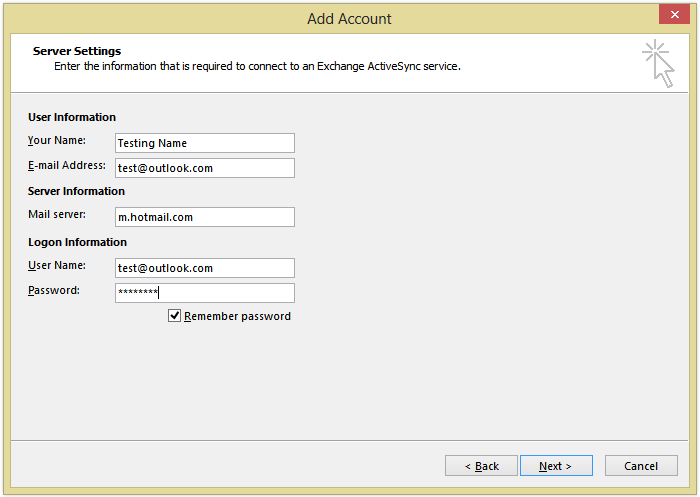
ActiveSync lets you send, receive & synchronize not just your emails, but also your calendar, contacts or tasks. When you add the outlook.com account to Outlook 2013, on the first screen make sure you select “Manual setup or additional server types”. On the next screen, choose “Outlook.com or Exchange ActiveSync compatible service” and enter the following Active Sync server settings:
Mail Server: s.outlook.com (if it doesn’t work, also try m.hotmail.com)
Also, mark the box to use TSL/SSL for the server connection.

User Name: yourusername@outlook.com email address
Password: yourusername@outlook.com password
Outlook.com Active Sync Server Settings


Overview: Outlook.com Server Settings

The Outlook.com mail server settings are valid for every email client application that supports the POP3, IMAP or Active Sync protocols, no matter the platform (Windows, Mac, iOS, Android, etc).
OUTLOOK.COM POP3 SERVERS
Incoming mail serverpop3.live.com
Incoming mail server port995 (SSL required)
Outgoing (SMTP) mail serversmtp.live.com
Outgoing (SMTP) mail server port587 (SSL/TLS required)
Outgoing server (SMTP) authenticationyes, same settings as my incoming mail server
OUTLOOK.COM IMAP SERVERS
Incoming mail serverimap-mail.outlook.com
Incoming mail server port993 (SSL required)
Outgoing (SMTP) mail serversmtp-mail.outlook.com
Outgoing (SMTP) mail server port587 (SSL/TLS required)
Outgoing server (SMTP) authenticationyes, same settings as my incoming mail server
OUTLOOK.COM VIA ACTIVE SYNC
Active Sync mail serverm.hotmail.com (SSL required)


===========❤❤❤============
Thanks for reading. 
Will be much appreciated if you 
"follow my page", "recommend/like this article" 
and "leave a message"
Stay Awesome and Be Blessed Today!
Zen Lakwatsera
===========❤❤❤============

(http://www.outlook-apps.com/outlook-com-pop-settings/#!prettyPhoto)

Monday, January 26, 2015

5 Things That Will Make Everybody Believe That You Are Absolutely Gorgeous

5 Things That Will Make Everybody Believe That You Are Absolutely GorgeousThe way we look is as important for us as its is for others.  Your appearance tells others a lot about you. Let this source of information be trustworthy and reliable. You do not want to be misunderstood by others, do you?
We are not talking about such things as skin, hair or weight. Of course they are important, but there are even more essential things to consider if you want to be attractive.
What is it that might make you look and feel really beautiful? And would we all agree on what real beauty is? What you find attractive can be considered average or even unattractive by someone else. Beauty is in the eyes of the beholder and is a very subjective thing. This is only true when we are talking about the outside beauty. However, if we are talking about the inner world of the person, then most of us would find the same things attractive. These include good manners, behavior, friendliness and generosity. They way we dress and even move can repel or attract others. The following 5 things will always help you look stunning.
1. The way you dress
Women follow fashion. We are trying to determine what we look best in. Here every detail plays an important part in creation of the entire image. If you know what colors, patterns, type of fabric you look best in, then you notice that reaction of other people around you is different and much more positive. When you know you look good you self-confidence and self-esteem are increasing. If you know the basic hints and tricks, there is a lot you can do to hide all the defects and emphasize what is worth being proud of. Wear clothing that suits you. If you are not sure how to dress, you can always ask professionals for advice and they will help you look beautiful.
2. Your eyes
It is too hard to argue with the fact that our eyes are the mirror reflecting our soul. They express your inner thoughts and secret feelings. No matter how good you are at pretending, your eyes will always tell others what really is on your mind. Do not forget that whether you are sad, happy or tired, your eyes will give you away even if you try to apply good make-up to hide negative emotions. Start with changing your mind and thoughts. Of course you can hide dark circles under your eyes after a sleepless night, however, there is no mascara, eyeliner or eye shadow that can hide anger or frustration. Our recommendation is that you should think positively. All sorts of problems can be solved. Never give up even if you are in trouble, radiate happiness and joy.
3. Good manners
Being a lady means being well-mannered, friendly and polite. It does not mean that you need to pretend. Be yourself but let others be themselves and do not get upset or irritated if someone is not as polite as you would like them to be. Here the point is for you to keep good manners and behave the right way. Polite people look more intelligent even if they have no degrees! We associate politeness and good manners with royalties and aristocrats. Isn’t it flattering to be looked up to? Then why don’t you try and be a kind of “queen”? Behave like one and other will accept you as one! More people will want to be your friends because they will be intrigues and attracted by your personality. Being a “royalty” does not mean being a snob. Stay open and friendly, approachable and cheerful. This will make you look stunning for sure!
4. Your confidence
Self-confidence is one of the qualities that every human should have. In reality some of us are too shy to demonstrate this quality. It is challenging to show that you believe in yourself and your strong points, because later on you will need to follow the image and be responsible for your own mistakes and failures. Do not be afraid of showing your best sides to others. There is something you are good at. Then why don’t you show it? There is no need to hides your talents and skills, to be ashamed of them or ignore them! There is nothing wrong about being appreciated by others.
5. Your smile
A sincere and warm smile can work wonders. It’s a magical and powerful tool. It softens your face and attracts people because a smiling person looks friendlier than someone who frowns. A frank smile is capable of transforming an averagely looking person into a real cutie. Smile and your eyes will sparkle with happiness and joy. It does not cost anything to smile at someone. They will want to smile back at you which will be the first step toward something positive. People say that you should always smile because someone might fall in love with your smile. Do not miss your chance to meet someone special then! Remember that a natural smile can replace the most luxurious make-up.

Beauty is a very broad and controversial subject. It includes the whole of you: you face, body as well as mentality and attitude. Cultivate good qualities in yourself, work on constructive thinking, and express your positive feelings and emotions! Love yourself and you will understand that the world loves you back. There are more things that can help you become a better person besides those we have mentioned above.

===========❤❤❤============
Thanks for reading. 
Will be much appreciated if you 
"FOLLOW MY PAGE", "LIKE THE ARTICLE" and "LEAVE A COMMENT"
Stay Awesome and Be Blessed Today!
Zen Lakwatsera
===========❤❤❤============
A repost from original article:
http://wmnlife.com/beauty-fashion/5-things-that-will-make-everybody-believe-that-you-are-absolutely-gorgeous/5